01
Business details
Trading name, phone, email, and brand voice.
SEO AutoPilot's five-step setup wizard captures your business once — including content targeting (B2C venues vs B2B lead gen) on step 3 and in Settings → Business. Launch publishes your first post immediately. After that, daily cron keeps compound visibility growing.
The setup wizard captures your business, audience mode, and schedule — then SEO AutoPilot publishes on autopilot.
01
Trading name, phone, email, and brand voice.
02
What you offer and suburbs you serve.
03
B2C or B2B — forms, copy, and images follow.
04
Provider, approval mode, and posting cadence.
05
First post publishes immediately on your theme.
After launch, refine business, market, and content settings anytime. Changes apply to newly generated posts — bulk refresh older content with SEO Backfill on paid plans.

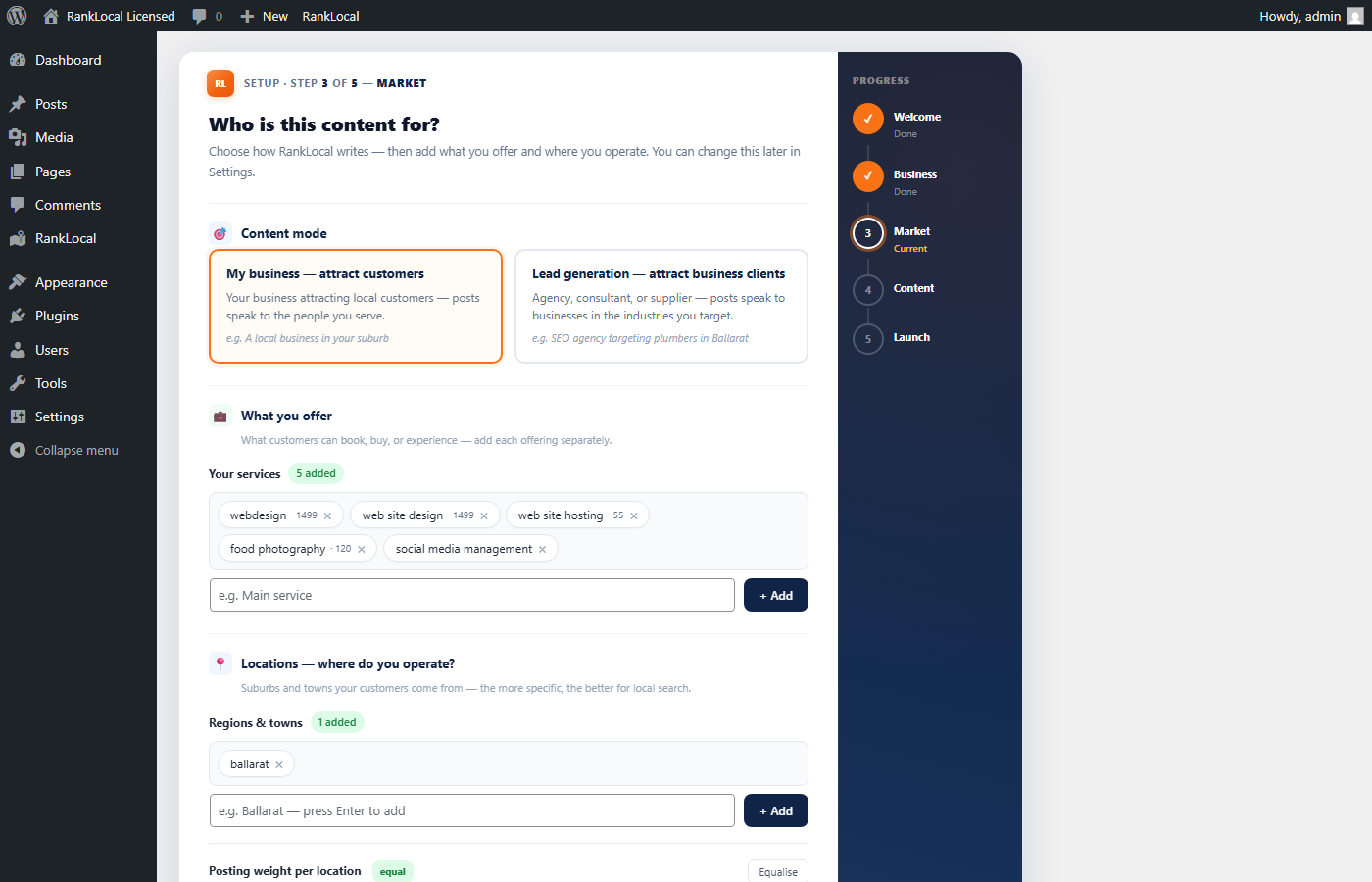
B2C mode relabels admin navigation to CTA and uses enquiry forms without budget fields. B2B keeps Leads with quote forms and industry targeting. The same control appears on Local Content and Settings → Business after launch.
B2C vs B2B content targeting → · For restaurants & venues · For agencies & B2B lead gen
WordPress cron triggers SEO AutoPilot's publishing engine on your configured schedule. Here's a typical week on the default daily trial cadence.
Wizard saves settings. One sample article publishes immediately with schema, internal links, SEO score, and an embedded form matching your content mode (enquiry CTA or quote form). You edit or delete like any WordPress post.
Each night (or on your paid custom schedule), SEO AutoPilot drafts a service × suburb article, scores it, adds Article + FAQ schema, and publishes. Template rotation varies format — standard, listicle, seasonal.
Open Overview: confirm last night's post, scan new leads, check SEO score column. No writing required unless you want to tweak copy.
Stale posts regenerate on a rolling schedule — keeping archive content current without manual rewrites. Paid plans can bulk-refresh with SEO Backfill.
Automated monthly summary: posts published, leads captured, PDF download, and scheduled email. Share a read-only client dashboard link — no WordPress login for your customer. Agency adds white-label branding, manual on-demand reports, multi-recipient delivery, and lead breakdown by blog vs landing page vs other forms.
SEO AutoPilot builds the signals search engines reward: fresh local content, structured data, internal linking, and a site that stays active. Visibility compounds over months — we don't promise guaranteed #1 rankings or specific position gains.
What you can expect: wake up to new indexed local pages, a growing archive of suburb coverage, and leads attributed to the pages that generated them.
Start free trial → · Compare plans · Content targeting guide · Setup FAQ